
zipTimer: an iPod/iPhone app for pacing piano practice, cooking, workouts, you name it.
Here is the Python code for a function which factors its argument into primes. It an be called at the commandnd
line:
I can’t read the commentary, but this is a beautiful image. Look for more on this site!
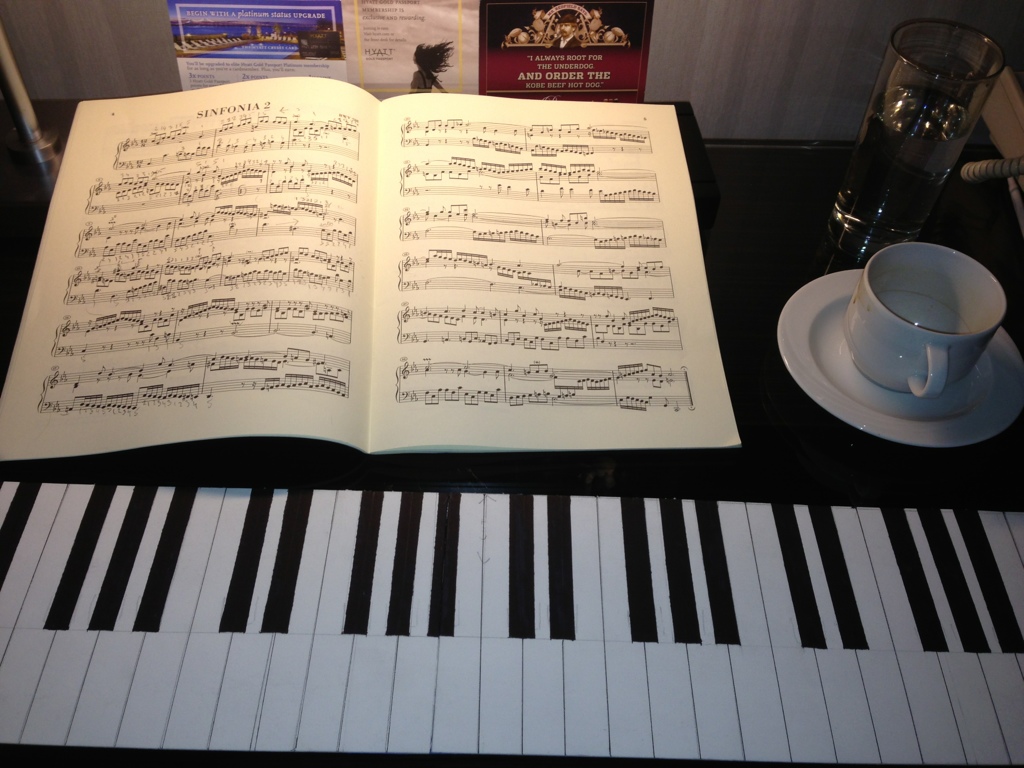
Great for practicing while on the road – folds once to fit in my backpack or small suitcase.
Location: hotel room in San Diego.
zipTimer: an iPod/iPhone app for pacing piano practice, cooking, workouts, you name it.

I could not find a dumb keyboard to buy, so I made one using stiff cardboard, a rule, pencil, fine marker, thick marker, and exacto knife. Very low-tech, but it works!
If you do this yourself, I recommend a square as well — to make good right angles. You can take measurements from a real piano, or look them up on the internet. I did the latter, since I was away from a piano when I decided to build the dumb keyboard. You can get all the supplies you need at an art store. Oh yes — you need a good cutting surface or you will be in trouble with someone:-) Art stores also sell nice cutting mats if cutting is something you will do regularly.
zipTimer: an iPod/iPhone app for pacing piano practice, cooking, workouts, you name it.
With four lines of text you can add a command to do this:
% ev "sqrt(2)"
1.4142135623730951
Below is the code — just put it in your personal bin or script directory:
#! /usr/bin/env python3
import sys
from math import *
print(eval(sys.argv[1]))
This is useful for quick one-line computations. For more, it’s of course better to jump into the Python interpreter — or sage. If you have any Python functions that you want to use in this way, just add an import statement to the above. For example, in my PYTHONPATH directory, I have a file mathtools.py which defines a function factor.
Thus I can do this:
% ev "factor(123456789)"
[3, 3, 3607, 3803]
provided that I add the line
from mathtools import *
to the code for ev.
zipTimer: an iPod/iPhone app for pacing piano practice, cooking, workouts, you name it.
Below is Python code to send an appropriately formatted string representing the date and time over the serial port (USB) to an Arduino board. I use this for a temperature monitor.
zipTimer: an iPod/iPhone app for pacing piano practice, cooking, workouts, you name it.
"""
File:     pst.py (Port Send Time)

Purpose:  Set the time on the arduino board
          for use with the Time library found
          at http://playground.arduino.cc/Code/time

Usage:    % python pst.py

Effect:   Send message like "T1359713903" over the serial port
          That is the time string for Fri Feb  1 10:18:23 EST 2013

Config:   Set the variable "time_zone_offset" for the offset to GMT.  The
          value -5 works for US Eastern Standard Time

          Set the variable port to the usb port used by your Arduino
          board.  In Arduino IDE, go to Tools > Serial Port and note
          which port is checked.

Ref:      http://www.moosechips.com/2010/07/python-subprocess-module-examples/

Author:   J. Carlson, Feb 2, 2013
"""

import os, subprocess

# Settings
time_zone_offset = -5
port = "/dev/tty.usbmodemfa131"

# Put stdout into pipe
proc = subprocess.Popen("date +%s", shell=True, stdout=subprocess.PIPE)
return_code = proc.wait()
# Read from pipe
for line in proc.stdout:
    time = int(line.rstrip())

# Output to terminal and port
print
os.system("date")
time += 60*60*time_zone_offset
print "Time:", time

cmd = "echo T" + str(time) + " > " + port
print "Cmd:", cmd
print
os.system(cmd)



 Circle and Square